
Studies · Sierra Chart
Forex Factory News
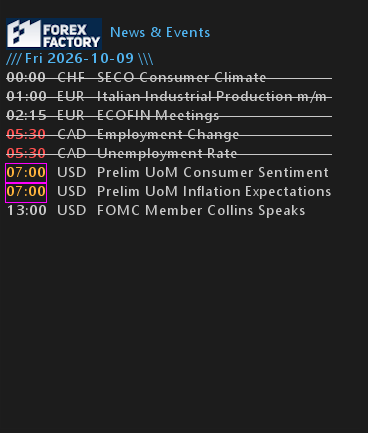
Shows the Forex Factory news feed in Sierra Chart.
Overview
Forex Factory generously provides a JSON data file each week from their website. The StarPenta study reads the file on a schedule and displays news and events within Sierra Chart. StarPenta happily displays the Forex Factory logo in this study in appreciation of their open access to the calendar of events.
Help
Help for this study, and all StarPenta studies, is also available from the F6 Studies dialog and the Description button on the Settings page for each study.
Inputs
| Input Name | Input Description |
|---|---|
| Days To Show | Number of calendar days to show, starting today in the chart time zone. 1 = today only; 7 ≈ full FF week window. Feed times are US/Eastern and are converted for display. |
| X Position (pixels) | Horizontal pixel offset from the left of the study region. |
| Y Position (pixels) | Vertical pixel offset from the top of the study region. |
| Font Name | Font face used for day headers and event lines. |
| Font Size | Font height in pixels. Line spacing comes from GetTextSize, not a fixed line-height input. |
| Transparent Background | When Yes, text is drawn with a transparent background. When No, Text Background Color fills behind each line. |
| Text Background Color | Background behind text when Transparent Background is No. |
| Title Color | Color for day headers (/// Mon YYYY-MM-DD \\\). |
| High Impact Color | Color for High impact events. |
| Medium Impact Color | Color for Medium impact events. |
| Low Impact Color | Color for Low impact events and Unknown impact. Also used for non-highlighted text in Time/Marker modes. |
| Item Impact Highlight | Item: color the whole event line by impact. Time: color only HH:MM by impact; rest uses Low Impact Color. Marker: draw a square (text-height) left of the line in impact color; line text uses Low Impact Color. |
| Show Test Items | When Yes, inject sample High/Medium/Low items for today and tomorrow so layout can be tested with no live news. |
| Debug Log | When Yes, worker status messages are written to the Message Log. |
| Show Impact | When Yes, show the impact text column (High/Medium/Low/Holiday/etc.). When No, hide that column; highlight colors and Marker mode still use impact. |
| Show USD | When Yes, include USD events. |
| Show EUR | When Yes, include EUR events. |
| Show GBP | When Yes, include GBP events. |
| Show JPY | When Yes, include JPY events. |
| Show CAD | When Yes, include CAD events. |
| Show AUD | When Yes, include AUD events. |
| Show NZD | When Yes, include NZD events. |
| Show CHF | When Yes, include CHF events. |
| Show Others | When Yes, include events whose country is not one of the listed currencies (CNY, etc.). All country filters No = no news lines. |
| Highlight Before Minutes | Flash a rectangle around the time field when an event is this many minutes (or less) from starting. 0 = off. Flash: when seconds remaining % 5 != 0. |
| Highlight Rectangle Color | Outline color for the pre-event time flash rectangle. |
| Past Events | How to treat events whose start time is already past (US/Eastern). Hide: omit them. Strikeout: draw a line through the row. Dim: lerp text colors 50% toward Text Background Color. |
| Show Telemetry | When Yes, draw a timing line as the first overlay row (at X/Y), updated about every 30s: study-thread and DrawToChart costs for diagnosing chart pauses. |