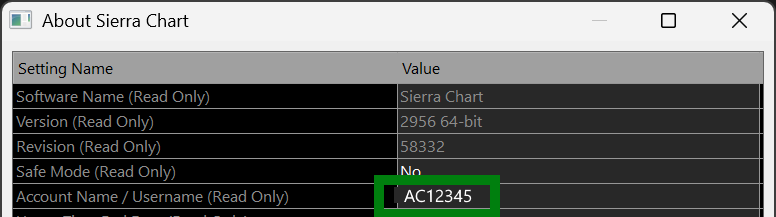
1. Finding your username
Use the Help → About menu in Sierra Chart to find your account name. Enter that exact username above when you enable access.

StarPentaPlus
Start a 21-day StarPentaPlus trial. Enable sends a confirmation link to your email; disable uses your Sierra username and passphrase. See the free-trial studies list for what’s included.
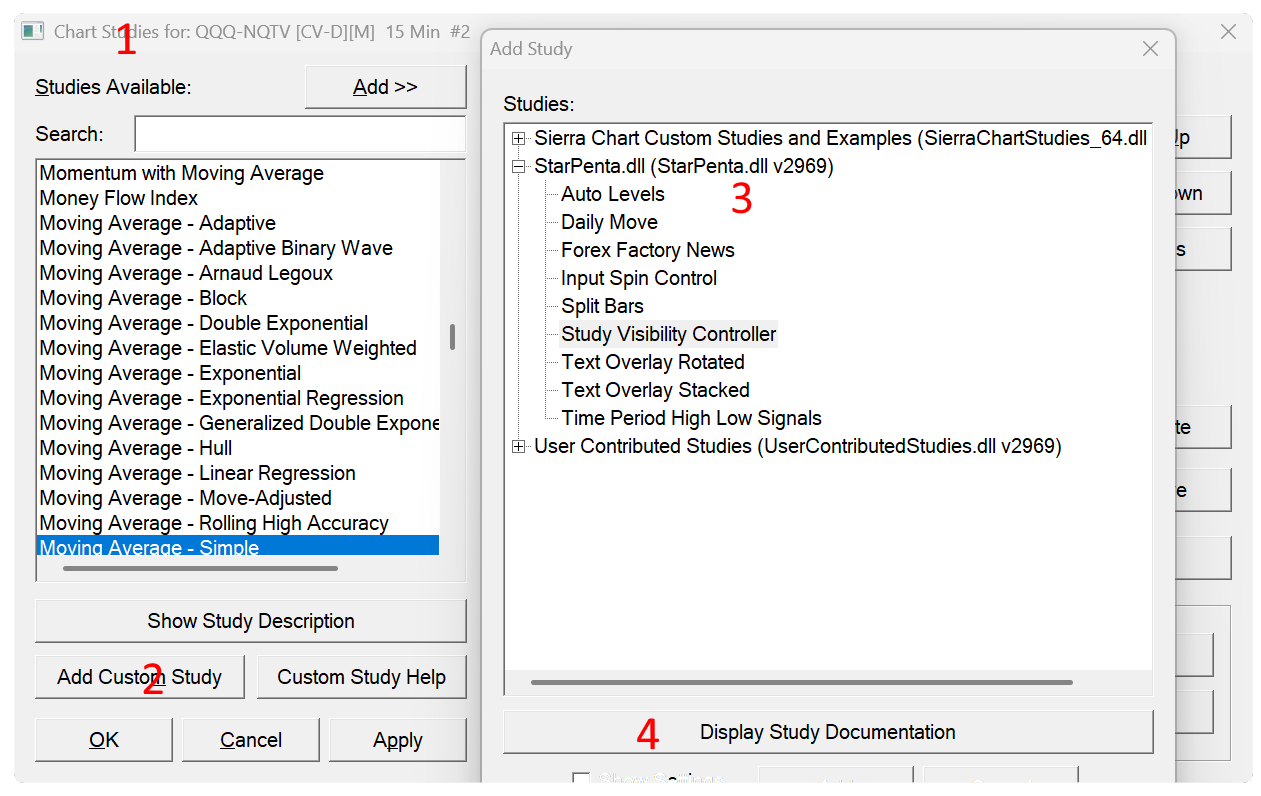
After you confirm, we authorize your username for StarPentaPlus. Then restart Sierra Chart so Plus studies show under Analysis → Studies → Add Custom Study. The attribution mark stays on during the trial — buying Plus clears it.
Enter your Sierra Chart username, email, and a passphrase. We email a one-time confirmation link (expires in 24 hours). Do not use your Sierra password as your passphrase.
Use the Help → About menu in Sierra Chart to find your account name. Enter that exact username above when you enable access.
After you confirm, restart Sierra Chart so it can download StarPentaPlus. Then open Analysis → Studies (F6), choose Add Custom Study, and select studies from the StarPentaPlus set. Study documentation is always available from the Display Study Documentation button and the Description button from the study settings dialog.