
Studies · Sierra Chart
Split Bars
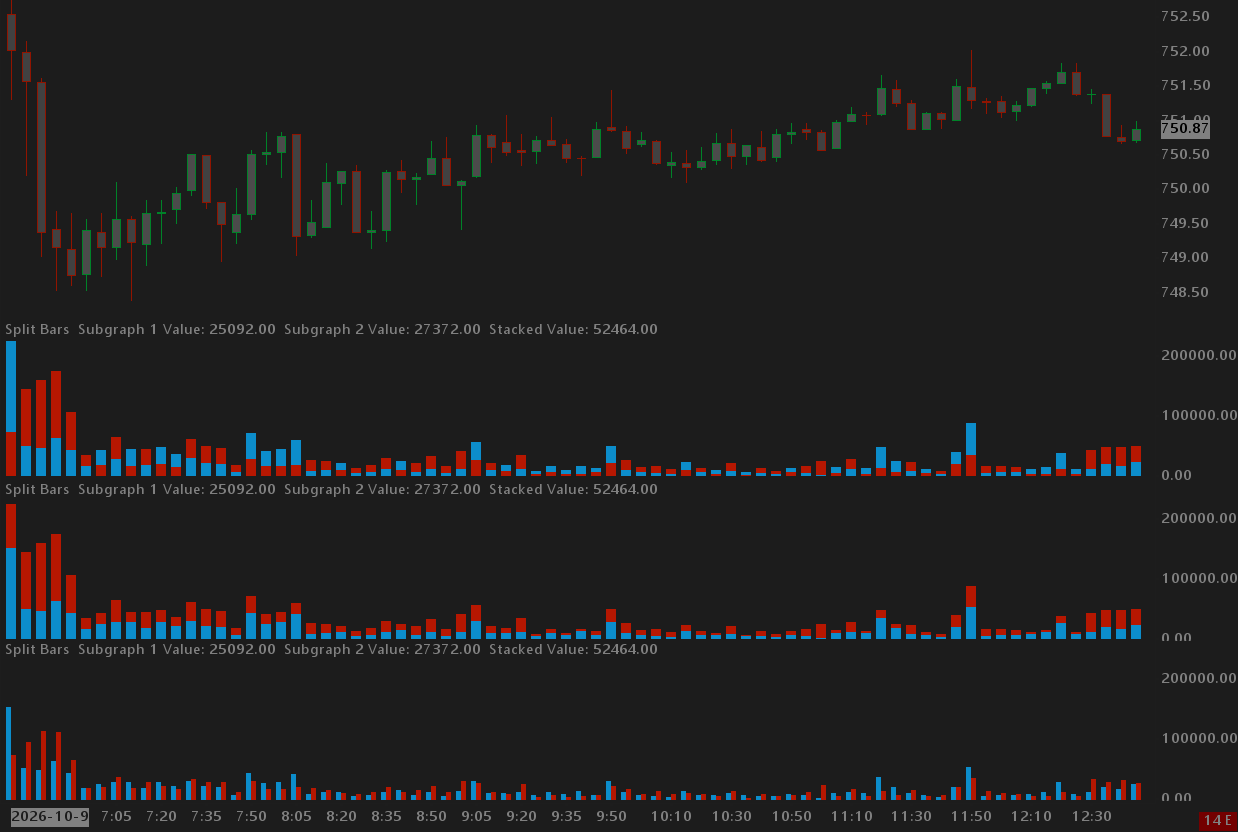
Three modes display two inputs per bar such as ask volume and bid volume.
Overview
Point the Split Bars study at two inputs and they are displayed as a single bar. Three modes display two inputs per bar such as ask volume and bid volume. Stacked, Stacked Descending, or Side by Side.
Help
Help for this study, and all StarPenta studies, is also available from the F6 Studies dialog and the Description button on the Settings page for each study.
Inputs
| Input Name | Input Description |
|---|---|
| Source Subgraph 1 | First study subgraph drawn on the left (side by side) or as the first stack segment. |
| Source Subgraph 2 | Second study subgraph drawn on the right (side by side) or as the second stack segment. |
| Color 1 | Fill color for subgraph 1. |
| Color 2 | Fill color for subgraph 2. |
| Multiplier 1 | Scale applied to subgraph 1 before drawing. |
| Multiplier 2 | Scale applied to subgraph 2 before drawing. |
| Set Subgraphs To Background Color | When Yes, the Sierra bar subgraphs are drawn in the chart background color so only the GDI split bars are visible. |
| Drawing Mode | Side by Side splits the bar left/right. Stacked stacks subgraph 1 then 2 from the zero line. Stacked Descending draws the smaller absolute value first. |