
Studies · Sierra Chart
Text Overlay (Rotated and Stacked)
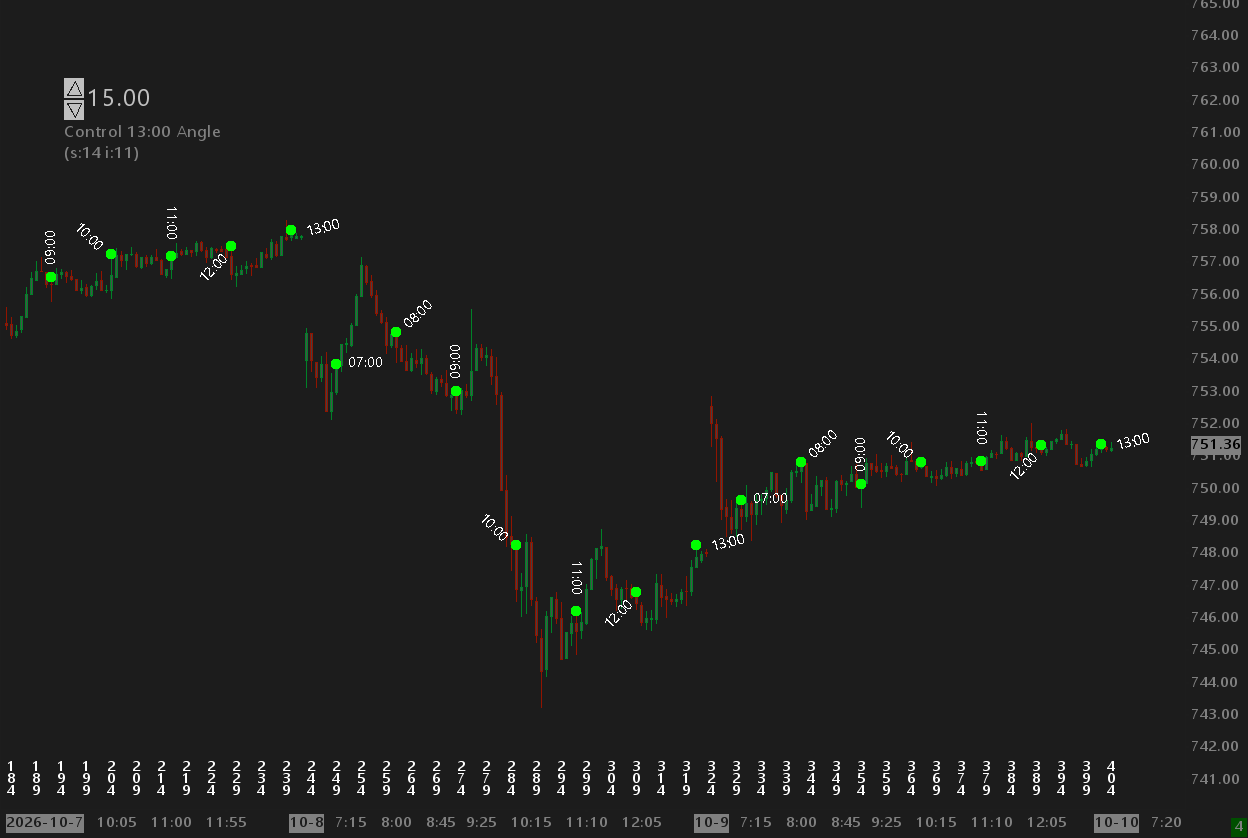
Text Overlay supporting rotated and stacked text.
Overview
There are two studies: Text Overlay Rotated and Text Overlay Stacked.
Text Overlay Rotated
Point the study at a subgraph and for each non-zero value/signal, the study will display that value with the text at a specified angle. Instead of the value, it can also display the date/time of the bar with the signal. The study allows you to specify the minimum distance between adjacent signals so the text does not overlap and make the chart messy and cluttered. This study may require a little adjustment and fine tuning to position rotated text at the desired location. Use the X and Y adjustments to move the text left, right, up, down as needed to get the desired look since variations in font size, font, and angle can affect the rendering. See the StarPenta example chart book for common settings. Use the Input Spin Control study to quickly adjust the angle to test different angles to find that perfect look. The anchor set to start/end helps control text orientation so text rotated from 6 o'clock to 12 o'clock is not upside down.
Text Overlay Stacked
Point the study at a subgraph and for each non-zero value/signal, the study will display that value with the text "stacked". The characters remain in their normal orientation and are stacked on top of each other. The image on this page shows this with the bar number for each bar as an example usage. This vertical stacking of text allows a more dense bar spacing before text start overlapping and affecting readability. This study may require a little adjustment and fine tuning to position stacked text at the desired location. You can adjust the vertical position up or down, as well as stack the text upward or downward.
Help
Help for this study, and all StarPenta studies, is also available from the F6 Studies dialog and the Description button on the Settings page for each study.
Text Overlay Rotated
| Input Name | Input Description |
|---|---|
| Study to Overlay | Source study and subgraph on this chart. Non-zero values select which bars get a label. A value of 0 means no label on that bar. Label text is controlled by Label Content. |
| Font | Typeface for the rotated labels. |
| Font Size | Point size for the rotated labels. |
| Padding | Extra pixels around the text when the background rectangle is drawn. |
| Positive Foreground | Text color when the source value is positive. |
| Positive Background | Rectangle fill color when the source value is positive. Used when Draw Rectangle is Yes and Draw Outline Only is No. |
| Negative Foreground | Text color when the source value is negative. The printed number is the absolute value. |
| Negative Background | Rectangle fill color when the source value is negative. Used when Draw Rectangle is Yes and Draw Outline Only is No. |
| Signal Overlay Location | Where each label is placed. - Region Top / Region Bottom: at that study region edge (nudge with X/Y Offset). - Open / High / Low / Close: that bar price. - Signal Value: the source subgraph value as a price. |
| Angle (degrees) | Text rotation in degrees (counterclockwise). Default 270 is vertical, reading downward. |
| Text Anchor | Which end of the text sits on the computed (X, Y) point. Start, Center, or End along the rotated baseline. |
| X Offset (pixels) | Horizontal offset in pixels after the overlay location is applied. |
| Y Offset (pixels) | Vertical offset in pixels after the overlay location is applied. |
| Draw Rectangle | Draw a background rectangle behind each label. |
| Draw Outline Only | When Draw Rectangle is Yes: fill with the chart background and stroke the rectangle in the value's background color, instead of filling with that color. |
| Label Content | Text drawn for each non-zero source bar. - Value: formatted source subgraph value (absolute value when negative; colors still follow sign). - DateTime: that bar's open Date-Time (chart timezone, Sierra FormatDateTime). - Date: bar open date as YYYY-MM-DD. - Time: bar open time as 24-hour HH:MM:SS. |
Text Overlay Stacked
| Input Name | Input Description |
|---|---|
| Study to Overlay | Source study and subgraph on this chart. Non-zero values are drawn as stacked labels. |
| Font | Typeface for the labels. |
| Font Size | Point size for the labels. |
| Padding | Extra pixels around the text when the background rectangle is drawn. |
| Positive Foreground | Text color when the source value is positive. |
| Positive Background | Rectangle fill color when the source value is positive. |
| Orientation | Horizontal or vertical stacked characters. |
| Vertical Draw Direction | When vertical: draw downward from the anchor, or upward. |
| Draw Rectangle | Draw a background rectangle behind each label. |
| Signal Tick Offset (Pixels for Top/Bottom) | Offset from the chosen location. Ticks for OHLC/signal value; pixels for region top/bottom. |
| Signal Overlay Location | Where each label is placed: region edge, bar OHLC, or the source value as a price. |
| Negative Foreground | Text color when the source value is negative. The printed number is the absolute value. |
| Negative Background | Rectangle fill color when the source value is negative. |
| Use Transparency | When Yes, the rectangle is outlined instead of filled. |