
Free-trial studies · StarPentaPlus
Volume Profile
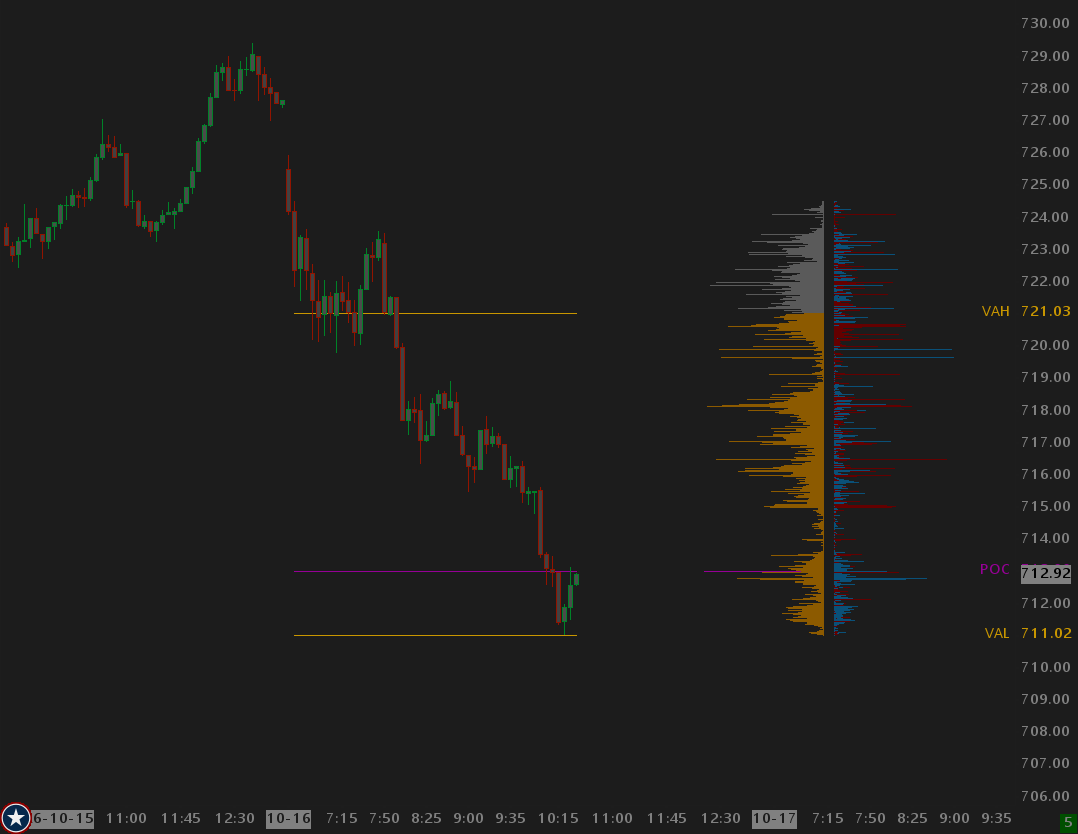
Volume-at-price profiles with POC, VAH, and VAL — built for session and multi-period chart work.
Overview
Part of StarPentaPlus. Configurable start/end windows, histogram drawing, and level subgraphs you can feed into Study Level Snapshots and overlays.
21-day free trial, then $49 once. Get StarPentaPlus
Help
Help for this study, and all StarPentaPlus studies, is also available from the F6 Studies dialog and the Description button on the Settings page for each study.
Inputs
| Input Name | Input Description |
|---|---|
| Profiles | This period: one profile from the latest Start Time forward. Each session: a new profile at every Start Time; completed profiles stay on the list. |
| Start Time | Clock time in the chart timezone when a profile begins. Collection uses bar open times (BaseDateTimeIn), not GetNow/replay clock: the first bar with open time >= Start is the first collected bar (bar-crossing). On a 15s chart, Start 06:31:00 begins on the 06:31:00 bar. On a 2m chart with bars stamped 06:30 and 06:32, Start 06:31:00 begins on the 06:32 bar — the 06:30 bar is before Start even though wall-clock 06:31 falls inside that candle. |
| Use End Time | When Yes, collection stops at End Time (the next matching clock time after Start). When No, This period runs through the last bar and Each session runs until the next Start Time. |
| End Time | Clock time in the chart timezone when collection stops. Same bar-crossing rule as Start: the first bar with open time >= End is outside the window (bars with open < End stay in). Always the next time after Start (06:30 to 06:29:59 is the following morning). Ignored unless Use End Time is Yes. |
| Ticks per Volume Bar | Tick compression. 1 is one histogram row per chart tick. Rows key at the high tick of the bucket. Absolute keys from price 0. Range center keys from the period high/low. POC and value area walk adjacent buckets. |
| Calculation Method | Absolute: buckets from price 0 (stable when a new high prints). Range center: cover the traded high/low and split leftover ticks both ends so the profile sits on the prices actually traded. |
| Value Area % | Share of total volume that the value area must cover. Sierra default 70. Expands one bucket at a time from the POC. |
| Ranking | Total Volume: POC and value area from volume; bars sized by volume. Delta: no POC/VA. Every row is Ask minus Bid, bars sized by abs(Delta), labels signed. |
| POC Tie Preference | When two or more buckets share the same maximum ranking, Prefer Higher takes the higher price, Prefer Lower the lower price. |
| Show Volume Labels | When Yes, DrawToChart prints each bucket's total volume at the profile start bar, vertically centered on the bucket mid. |
| Show Histogram | When Yes, DrawToChart fills a horizontal bar at each bucket. POC volume is 100% of Histogram Max Width; other rows are volume/POC. |
| Histogram Max Width | Pixel width of the POC bar. Other buckets scale as a fraction of POC volume, capped at this width. |
| Alignment | Left: bars grow left to right from the Positioning anchor. Right: bars grow right to left from the Positioning anchor. |
| Horizontal Adjustment | Pixels to shift the whole histogram and labels after Positioning. Positive moves right. Use to stack multiple Volume Profile instances. |
| Hide Borders Height Threshold | Borders on/off is decided once for the whole profile: draw borders only if every visible histogram bar is at least this tall. That avoids mixed 13/14-px ticks flickering borders on and off. 0 always draws borders when Line Width is not 0. A bordered bar uses a minimum 5px outer rectangle: 1px borders plus 1px each for the main rectangle top/mid/bottom. |
| Volume Label Placement | Base: at the bar origin (left or right by alignment). End: flush with the far edge; if the text is wider than the bar it stays on the origin side. Outside: just past the far edge, away from the origin. |
| Label Font | Typeface for bucket volume labels. |
| Label Font Size | Point size for bucket volume labels. |
| Use Large Number Display Formatting | When Yes, volume labels use compact suffixes: 1,000=1K, 1,000,000=1M, 1,000,000,000=1B. Up to two decimal places; trailing zeros are dropped. Below 1,000 stays a whole number. Same idea as Sierra VbP Use Large Number Display Formatting, but we start at 1,000 (Sierra starts at 10,000). |
| Skip Overlapping Pixel Rows | When Yes, skip a histogram bar and its label if its Y range overlaps a bar already drawn by more than the 1px shared seam (--top). POC is drawn first. Remaining rows are decreasing volume. Off keeps the draw-everything path for timing. |
| Histogram Transparency | Fill and border transparency for histogram bars. 0 is opaque, 100 is fully transparent. Passed to DrawRectangleTransparent and FillRectangleWithColorTransparent. |
| Positioning | Anchor for the histogram. Start/End: the profile start or end time bar. Region Left/Right: study region edge (This period only; Each session falls back to Start/End). With Region Right and Left alignment, the anchor is region right minus Histogram Max Width so a full-width bar stays on screen. Horizontal Adjustment then shifts the whole profile. |