
Studies · Sierra Chart
Auto Levels and Daily Move
Auto Levels and Daily Move Levels that automate daily charting tasks.
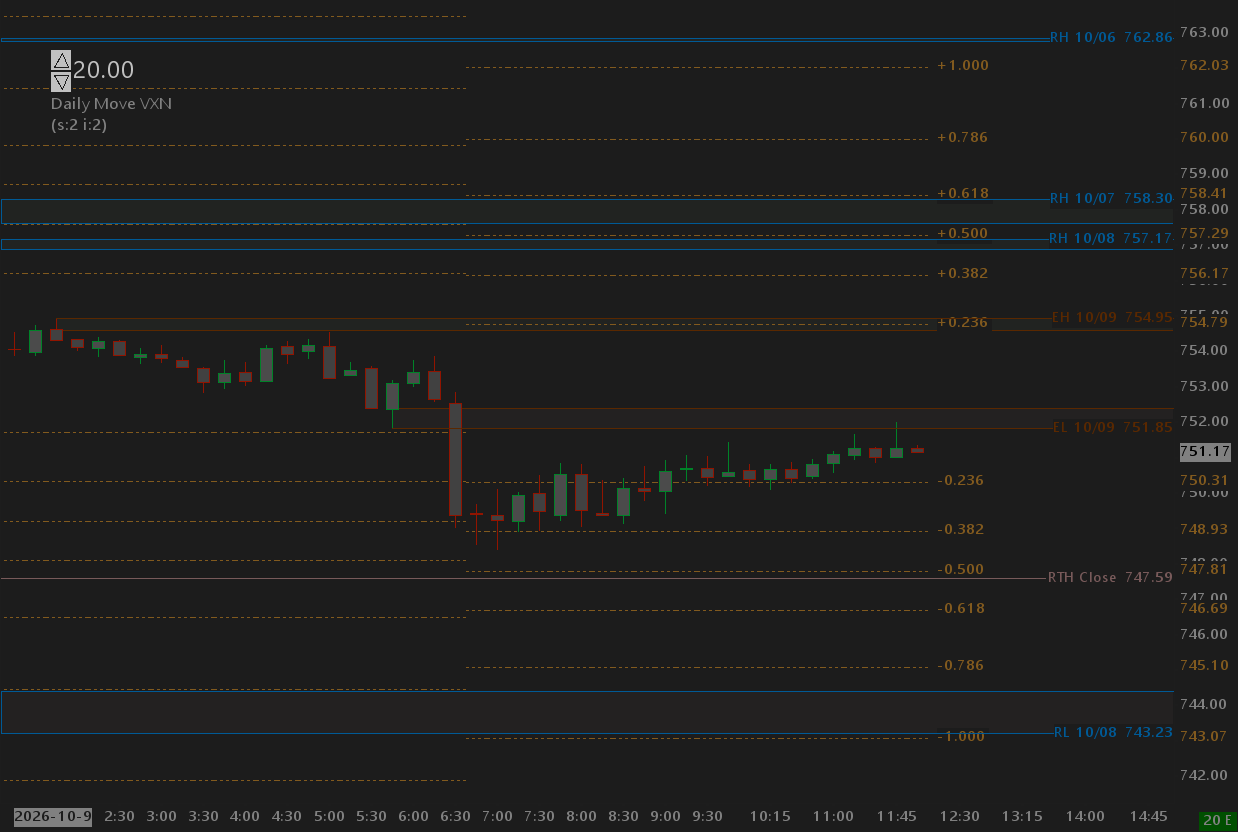
Overview
This page shows three studies: Auto Levels, Daily Move, and Input Spin Control.
Auto Levels
Auto Levels simplify the calculation of highly actionable levels such as
Pre-Market High, Pre-Market Low, Previous Day High, Previous Day Low, RTH Open and previous day RTH Close.
These levels are key levels every trader typically watches. The calculations for the Zones are closely related
to the technique that one of the most consistent and successful traders, Casey from Team2Trading, uses every day.
He posts on X frequently with
his approach and commentary on applying his process.
Rather than just showing a line for a given level, StarPenta shows these levels as zones using the next closest
bar's high/low or open/close to give a visual range around which price might be attracted, reject, retest, or from
which a breakout or continuation might occur.
Daily Move
Converting Implied Volatility to Expected Daily Move has been tracked and discussed for over a decade, probably longer. Macroption.com has a great page that outlines the formula and how to derive the expected daily move. Options report opening prices shortly after the RTH open, usually about a minute. The StarPenta Daily Move study lets you manually specify the VIX (VXN for QQQ, RVX for Russell) as a study input and then calculates the expected daily move with additional levels using Fibonacci ratios (.236, .382, .618, etc). If you have a data feed for the Volatility products, you can also snapshot the VIX at a given time of day (like 6:32am PT or 9:32am ET) or at the RTH cash close like 13:00 PT / 15:00 ET from another chart. The daily move levels are reference points where a trader might watch for price to be attracted, reject, retest, or from which a breakout or continuation might occur.
Input Spin Control
See the Widgets and Utilities page for more details. In short, this study gives you a spin control where you can increase/decrease a study input without having to open the settings dialog. Very convenient for tuning the VIX value for the daily move study.
Help
Help for this study, and all StarPenta studies, is also available from the F6 Studies dialog and the Description button on the Settings page for each study.
Auto Levels
| Input Name | Input Description |
|---|---|
| RTH Start Time | Time of day in the chart timezone when RTH starts. The first bar at or after this time begins the RTH range. |
| RTH End Time | Time of day in the chart timezone when RTH ends. The first bar after this window commits the RTH high/low. |
| Euro Start Time | Time of day in the chart timezone when the Euro session starts. |
| Euro End Time | Time of day in the chart timezone when the Euro session ends. Confirmed Euro zones are drawn then. |
| RTH High/Low On Breach | When price trades through a confirmed RTH high/low: Remove deletes the drawing; Clip stops it at the breach bar. |
| Confirmed Zone Transparency | Fill transparency for confirmed RTH and Euro zones (0 = opaque, 100 = invisible fill). |
| Developing Zone Transparency | Fill transparency for developing Euro zones shown in the last hour before Euro end. |
| RTH Open Color | Color of the RTH open line. |
| RTH High Border Color | Border color of the confirmed RTH high zone. |
| RTH High Fill Color | Fill color of the confirmed RTH high zone. |
| RTH Low Border Color | Border color of the confirmed RTH low zone. |
| RTH Low Fill Color | Fill color of the confirmed RTH low zone. |
| Euro High Border Color | Border color of the confirmed Euro high zone. |
| Euro High Fill Color | Fill color of the confirmed Euro high zone. |
| Euro Low Border Color | Border color of the confirmed Euro low zone. |
| Euro Low Fill Color | Fill color of the confirmed Euro low zone. |
| Euro Developing High Border Color | Border color of the developing Euro high zone. |
| Euro Developing High Fill Color | Fill color of the developing Euro high zone. |
| Euro Developing Low Border Color | Border color of the developing Euro low zone. |
| Euro Developing Low Fill Color | Fill color of the developing Euro low zone. |
| Debug Level | Message log verbosity. Off for production. Info and Verbose write AutoLevels messages to the Sierra log. |
| RTH High Level Label | Text drawn on the RTH high zone. Empty uses RTH_High. |
| RTH Low Level Label | Text drawn on the RTH low zone. Empty uses RTH_Low. |
| Euro High Level Label | Text drawn on the Euro high zone. Empty uses Euro_High. |
| Euro Low Level Label | Text drawn on the Euro low zone. Empty uses Euro_Low. |
| Show Level Date (MM/DD) In Label | When Yes, appends MM/DD from the session date to each zone label. |
| Range Mode | How the second bar of a high/low zone is measured: closer of that bar's open/close, or that bar's high/low. |
| RTH Close Color | Color of the RTH close line. |
Daily Move
| Input Name | Input Description |
|---|---|
| Volatility Source | Hard-coded and Snapshot freeze Open and IV at Snapshot Time (horizontal levels until the next snapshot). Hard-coded uses the volatility input; Snapshot reads the other chart. Dynamic reads the other chart at each bar and follows this chart's Open. |
| Hard-coded Volatility | Annualized implied volatility in percent when source is Hard-coded. 20 means 20%, not 0.20. Used at Snapshot Time with this chart's Open. |
| Volatility Chart | Chart number of the volatility symbol when source is Dynamic or Snapshot. Last is IV percent (VIX convention). Bar times are matched with GetContainingIndexForSCDateTime. |
| Snapshot Time | Clock time on this chart (chart timezone) to calculate levels when source is Hard-coded or Snapshot. Default 06:32:00. Open and IV at that time are frozen so the fibs are horizontal until the next day's snapshot. |
| Display Days | All Days fills every bar. Current Session fills only bars on this chart's current trading day (session times on this chart). |
| Trading Days Per Year | Divisor under the square root. 252 is the usual US session count. 256 is the rule-of-16 shortcut. |