
Studies · Sierra Chart
Time Period High Low Signals
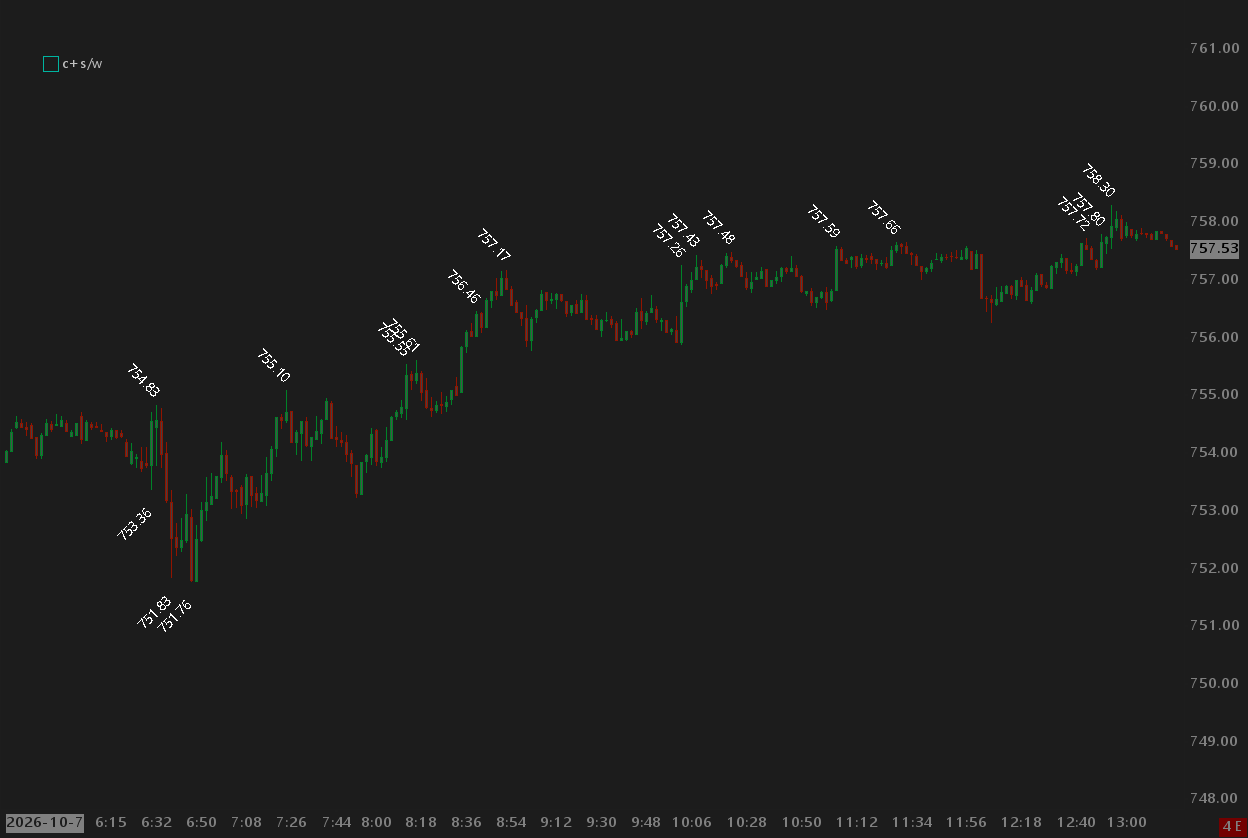
Time Period Higher Highs and Lower Lows with rotated text overlays.
Overview
Time Period High Low Signals shows higher highs and lower lows with those levels displayed using a Text Overlay study with the text rotated. The study allows you to specify the minimum distance between adjacent signals so the text does not overlap and make the chart messy and cluttered. Also shown is the Study Visibility Controller study which allows you to show or hide up to 20 studies with a click or a keyboard shortcut. See the Widgets and Utilities page for more details.
Help
Help for this study, and all StarPenta studies, is also available from the F6 Studies dialog and the Description button on the Settings page for each study.
Inputs
| Input Name | Input Description |
|---|---|
| Start Time | Start of the time-of-day window (chart timezone), same idea as High/Low for Time Period. |
| End Time | End of the time-of-day window (chart timezone). If earlier than Start Time, the window crosses midnight. |
| Input Data High | Price array used for period highs. |
| Input Data Low | Price array used for period lows. |
| Number Of Days To Calculate | How many calendar days back from the last bar to calculate. |
| Gap (Pixels) | Minimum horizontal pixel gap between kept signals. Newer strict higher highs clear older highs closer than this; newer strict lower lows clear older lows closer than this. Distance uses cached pixels between adjacent bars × bar index delta. Default 10. 0 disables proximity clearing. Closed-bar extremes stay in an internal list; Gap only changes which ones are published to the subgraphs. |